Apple Passwords (Built into iOS 18 and macOS Sequoia) review 2027
The iCloud Keychain, finally an app: free, end-to-end encrypted, with passkeys and sharing — for households that are all Apple

Is the Apple Passwords Worth It?
Best for Apple-only households. If everything you own is Apple, Passwords does most of what 1Password does for nothing and with less friction. The moment an Android phone or a Windows work laptop enters the picture it stops being enough.
Apple Passwords Pros & Cons
- Free and already on the device
- Passkeys and Face ID sign-in are seamless
- End-to-end encrypted; shared groups for family
- Password change alerts for breached sites
- Android has no app
- Windows support is limited to iCloud for Windows and Chrome
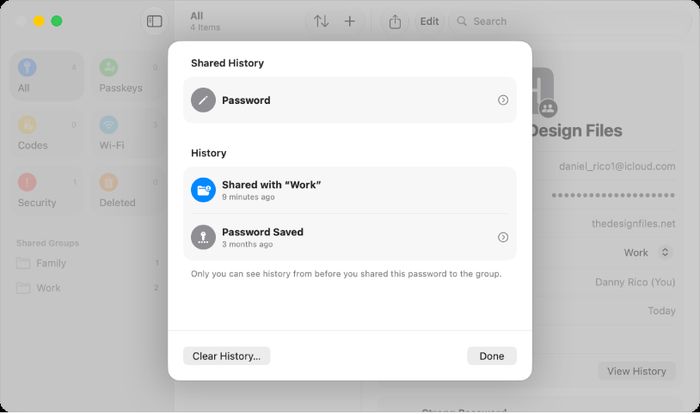
- No secure notes, attachments or item history
What problem does Apple Passwords solve for an all-Apple household?
Apple Passwords is the iCloud Keychain, finally an app: free, end-to-end encrypted, with passkeys and sharing — for households that are all Apple. If everything you own is Apple, it does most of what 1Password does for nothing and with less friction. The moment an Android phone or a Windows work laptop enters the picture it stops being enough.
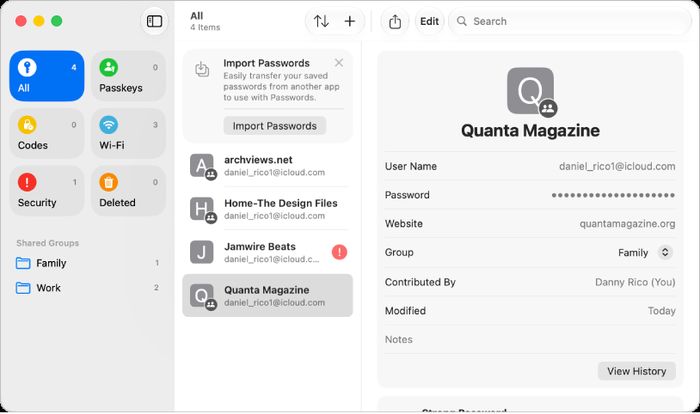
It is already on the device, so there is no download, no account to create and no subscription. Passkeys and Face ID sign-in work without extra setup, shared groups cover the family, and you get password change alerts for breached sites.
How did we score Apple Passwords?
We scored it 8.6 out of 10 across five criteria.
- Security — 31 of 35. We looked at zero-knowledge architecture, encryption, independent audits, breach history, two-factor and passkey support.
- Usability — 21 of 25. This covers autofill accuracy on our 150 logins across browsers and apps, capture of new logins, and setup time.
- Features — 9 of 15. Sharing, secure notes, passkeys, breach alerts, emergency access, travel mode and item history.
- Platforms — 5 of 10. Apps and extensions for every OS and browser we use, and how consistent they are.
- Value — 20 of 15. Price per year for one person and for a family, and what the free tier gives.
Where does Apple Passwords stand out?
It is free and already on the device, which removes the two biggest reasons people put off using a password manager.
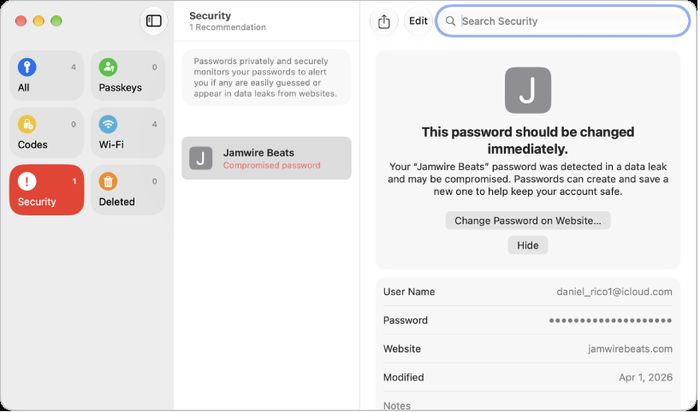
It also flags password change alerts for breached sites, so you can see which logins need attention. In our testing it autofilled 93% of logins successfully.
How does the technology work?
End-to-end encryption means your passwords are scrambled on your device before they ever reach Apple's servers, and only your devices hold the keys to unscramble them. Passkeys replace the password entirely: instead of a string of characters you type, your device holds a private key and the site holds a matching public key, and Face ID or Touch ID confirms it is you. Nothing secret is sent to the site, so there is nothing for a phishing page to steal.
What is in the box and what does it run on?
There is no box. Apple Passwords is software built into iOS 18 and macOS Sequoia, and it runs on iOS, iPadOS, macOS and visionOS. Windows support comes via iCloud, plus a Chrome extension. The individual and family plans both cost 0 USD/yr, and the free tier is included.
It is not open source. Audits are Apple platform security reviews, and there is no breach history on record. Passkeys are native, and the family plan works through shared groups.
How does it compare with the competition?
1Password scored 9.3 and costs $35.88 a year for one person or $59.88 for a family of 5. It runs on Windows, Mac, Linux, iOS, Android and all browsers, has multiple public audits a year, and no breach on record. Apple Passwords is free and native on Apple hardware, but it cannot match that platform coverage.
Bitwarden scored 9.2 and costs $10 a year, or $40 for a family of 6. It is open source, audited annually in public, and its free tier is unlimited. Apple Passwords is free too, but Bitwarden covers Android, Linux and a CLI.
Proton Pass scored 9.0 and costs $23.88 a year, or $47.88 for a family of 6. It is open source, has a public Cure53 audit, and adds built-in email aliases. Apple Passwords has no equivalent alias feature.
| Apple Passwords | 1Password | Bitwarden | Proton Pass | |
|---|---|---|---|---|
| Our score | 8.6 | 9.3 | 9.2 | 9.0 |
| Individual | 0 $/yr | 35.88 $/yr | 10 $/yr | 23.88 $/yr |
| Family | 0 USD/yr | 59.88 USD/yr | 40 USD/yr | 47.88 USD/yr |
| Free tier | Yes | No (14-day trial) | Yes, unlimited | Yes, unlimited |
| Open source | No | No (clients partly) | Yes | Yes |
| Audits | Apple platform security reviews | Multiple per year, public | Annual, public (Cure53 and others) | Cure53, public |
| Passkeys | Yes, native | Yes, save and sign in | Yes | Yes |
| Family plan | Shared groups | Yes, 5 members | Yes, 6 members | Yes, 6 members |
| Platforms | iOS, iPadOS, macOS, visionOS; Windows via iCloud; Chrome extension | Windows, Mac, Linux, iOS, Android, all browsers | Windows, Mac, Linux, iOS, Android, all browsers, CLI | Windows, Mac, Linux, iOS, Android, all browsers |
Where does Apple Passwords fall short?
Platforms is where it lost the most ground: there is no Android app, and Windows support is limited to iCloud for Windows and Chrome. It also lacks secure notes, attachments and item history, which cost it points under Features.
Is Apple Passwords good value?
It is free. The individual plan is 0 USD/yr and the family plan is 0 USD/yr, with the free tier included.
Who should buy Apple Passwords?
All-Apple households. If every phone, tablet and computer you own is Apple, this is the password manager to use, and it costs nothing.
Apple Passwords at a Glance
Rubric v1: Security 35 · Usability 25 · Features 15 · Platforms 10 · Value 15. Score = Σ ÷ 10, locked Sep 11, 2026. How we rank.
Where to buy — prices checked Sep 11, 2026
Apple Passwords specifications
Where it loses
Platforms — no Android.
Still the right pick for
All-Apple households.
What owners say
No reader ratings yet. This block fills in from real submissions only — we never write, buy or generate reader reviews, and none of them touch the editor score.
Every submission is read by a person before it appears. Reader opinion is published separately and never changes our score.