CapCut (Desktop / Pro) review 2027
The free editor built for TikTok, Reels and Shorts, with auto captions and templates that a phone-first creator already knows

Is the CapCut Worth It?
Best free editor for social video. For vertical social video CapCut is faster than any professional editor and free. It was the wrong tool for our long-form 4K project, which is what the ranking measures, and its ownership is a consideration for some.
CapCut Pros & Cons
- Free with no watermark on the desktop app
- Best auto-captions for short vertical video
- Same project moves between phone and desktop
- Templates match current TikTok formats
- Owned by ByteDance; read the data terms
- No multicam, weak audio tools
- Pro features and effects have moved behind the paywall over time
What problem does CapCut solve for short-form video creators?
CapCut is the free editor built for TikTok, Reels and Shorts, with auto captions and templates that a phone-first creator already knows. For vertical social video it is faster than any professional editor and costs nothing. It was the wrong tool for our long-form 4K project, which is what the ranking measures, and its ownership is a consideration for some.

The benefits that matter here are practical: the desktop app is free with no watermark, its auto-captions are the best we tested for short vertical video, the same project moves between phone and desktop, and the templates match current TikTok formats. That combination suits short-form creators who publish constantly and edit on whatever device is nearest.
How did it score 7.5 out of 10?
We scored CapCut across five criteria, each with a fixed maximum.
- Editing tools — 17 out of 30. This measures multicam, keyframing, colour grading, audio, titles and effects: what the project needed and what was missing. CapCut lost the most ground here.
- Performance — 14 out of 20. Timeline playback and export time for the same 4K project on the same two machines.
- Ease of learning — 18 out of 20. Time for a beginner on the team to produce a finished 2-minute video. This is CapCut's strongest result.
- AI & output — 9 out of 10. Auto-captions, silence removal, text-based editing, export presets and direct publishing.
- Value — 17 out of 20. Price over three years, including whether a one-time licence exists.
The total is 7.5, fifth of the seven products we tested in this category.
Where does CapCut stand out?
Two measured results define the case. The same 4K project exported on a Mac in 8.6 minutes, and the three-year cost came to $0. No paid rival in this comparison matches that combination for short-form work.

The test pros back it up: free with no watermark on the desktop app, the best auto-captions for short vertical video, projects that move between phone and desktop, and templates that match current TikTok formats. For a creator publishing daily, those four things cover most of the job.
What is CapCut made of, and what does it run on?
The specification is straightforward. CapCut runs on Windows, Mac, iOS, Android and web, with a free tier and Pro at $9.99 per month or $74.99 per year. There is no one-time licence. Multicam is absent and colour grading is basic. Auto captions are excellent, and maximum export is 4K.
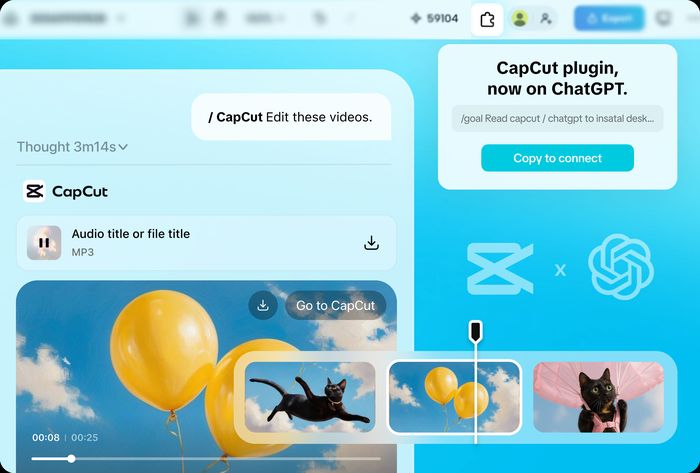
That platform spread is the widest in this comparison, and it is the reason the phone-to-desktop workflow holds together. The gaps — no multicam, basic colour — are the same gaps that cost it points under editing tools.
How does CapCut compare with the rivals we tested?
DaVinci Resolve scored 8.7 and is free, with Studio at $295 once. Against CapCut it wins on editing tools and colour, and it carries a one-time licence that CapCut does not offer.
Final Cut Pro scored 8.5 at $299.99 one-time with a 90-day trial, on Mac and iPad. It has multicam, good colour grading, Transcribe to Captions and 8K export. It is the faster editor on a Mac, but it is not free and it does not run on Windows or Android.
Wondershare Filmora scored 8 at $49.99 per year or $79.99 perpetual, with AI credits extra. It runs on Windows, Mac, iOS and Android, has a watermarked free version, basic multicam, basic colour grading, AI auto captions and 4K export. CapCut is free where Filmora is not, and CapCut's captions are the stronger of the two.
Adobe Premiere Pro scored 7.9 at $22.99 per month for the single app, with no one-time licence. It has multicam, Lumetri colour grading, best-in-class auto captions and 8K+ export. It is the more capable long-form tool; CapCut is the faster route to a vertical post.
Camtasia scored 6.5 from $179.88 per year, with no perpetual licence offered new. It has no multicam, basic colour grading, auto captions via the Audiate add-on and 4K export. CapCut beats it on price and on captions.
Feature comparison: CapCut against the field

| CapCut | DaVinci Resolve | Final Cut Pro | Wondershare Filmora | |
|---|---|---|---|---|
| Our score | 7.5 | 8.7 | 8.5 | 8.0 |
| Price | Free; Pro $9.99/mo or $74.99/yr | Free; Studio $295 one-time (free updates) | $299.99 one-time; 90-day trial | $49.99/yr or $79.99 perpetual; AI credits extra |
| Platforms | All | Win, Mac, Linux, iPad | Mac, iPad | Win, Mac, mobile |
| Free version | Yes | Yes | 90-day trial | Yes (watermark) |
| One-time licence | No | Yes | Yes | Yes |
| Multicam | No | Yes | Yes | Basic |
| Colour grading | Basic | Industry-leading (Color page) | Good | Basic |
| Auto captions | Yes, excellent | Yes (Studio: AI transcription) | Yes (Transcribe to Captions) | Yes (AI) |
| Max export | 4K | 4K free; 32K Studio | 8K | 4K |
Where does CapCut fall short?
It lost on tools: there is no multicam, and the long-form workflow is not there. The test cons add detail — owned by ByteDance, so read the data terms; no multicam and weak audio tools; and pro features and effects have moved behind the paywall over time.
That last point is the one to watch. Tools that were once free, such as the Background Remover, have drifted into Pro. The free tier is still generous, but the direction of travel is clear.
What does CapCut cost?
CapCut is free, with Pro at $9.99 per month or $74.99 per year. There is no one-time licence. Our measured three-year cost was $0, against $299.99 once for Final Cut Pro, $295 once for Resolve Studio, $49.99 per year or $79.99 perpetual for Filmora, $22.99 per month for Premiere Pro and from $179.88 per year for Camtasia.
Who should buy CapCut?
Short-form creators. If you publish vertical video to TikTok, Reels or Shorts, CapCut is free, fast and built around the formats you already use, and the same project follows you between phone and desktop. If you need multicam, strong audio tools or a long-form 4K workflow, the ranking measures exactly that, and this is where CapCut gives ground.
CapCut at a Glance
Rubric v1: Editing tools 30 · Performance 20 · Ease of learning 20 · AI & output 10 · Value 20. Score = Σ ÷ 10, locked Sep 11, 2026. How we rank.
Where to buy — prices checked Sep 11, 2026
CapCut specifications
Where it loses
Tools — no multicam; long-form workflow.
Still the right pick for
Short-form creators.
What owners say
No reader ratings yet. This block fills in from real submissions only — we never write, buy or generate reader reviews, and none of them touch the editor score.
Every submission is read by a person before it appears. Reader opinion is published separately and never changes our score.