Camtasia (Camtasia 2025) review 2027
Screen recording and editing in one, with cursor effects, callouts and quizzes — the standard for tutorials and training video

Is the Camtasia Worth It?
Best for screen recording and tutorials. If the video is of a screen — software demos, courses, onboarding — Camtasia's recorder and cursor tools save hours and it is worth the price. As a general editor it is behind Filmora at more than twice the cost.
Camtasia Pros & Cons
- Recorder captures screen, webcam, system audio and cursor in one pass
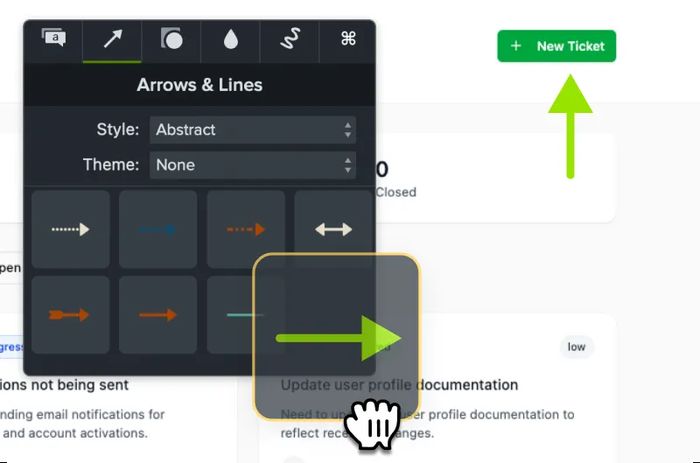
- Cursor smoothing, zoom-and-pan and callouts built for tutorials
- Interactive quizzes for training video
- Templates for course and onboarding video
- Expensive for what is, outside screen video, a basic editor
- Subscription now; perpetual licence discontinued
- AI features need the separate Audiate subscription
What problem does Camtasia solve for screen recording and tutorials?
Camtasia is built for video that is of a screen. Software demos, courses and onboarding clips are its territory, and the recorder captures screen, webcam, system audio and cursor in one pass. That single-pass capture is the reason trainers keep it around: you do not assemble a screen video from four separate recordings.
The editing side is tuned to the same job. Cursor smoothing, zoom-and-pan and callouts are built for tutorials, so the pointer stops jumping and the viewer's eye is directed where you want it. Interactive quizzes turn a training clip into something the viewer has to answer, and templates cover course and onboarding video so you are not starting from a blank timeline.

The verdict is narrow but clear: if the video is of a screen, Camtasia's recorder and cursor tools save hours and it is worth the price. As a general editor it is behind Filmora at more than twice the cost.
How did Camtasia score 6.5 in our testing?
Editing tools — 18 out of 30. We measured multicam, keyframing, colour grading, audio, titles and effects against what the project needed and what was missing.
Performance — 14 out of 20. Timeline playback and export time for the same 4K project on the same two machines. The 4K export on Mac finished in 8.2 min.
Ease of learning — 17 out of 20. We timed a beginner on the team producing a finished 2-minute video. This is Camtasia's strongest result and it matches the tutorial focus.
AI & output — 7 out of 10. Auto-captions, silence removal, text-based editing, export presets and direct publishing. Captions are present, but the AI features need the separate Audiate subscription.
Value — 9 out of 20. Price over three years, including whether a one-time licence exists. It does not, and that costs Camtasia heavily here.
What does Camtasia do better than most editors?
Four strengths came out of testing, and they are all the same strength viewed from different angles.
- The recorder captures screen, webcam, system audio and cursor in one pass.
- Cursor smoothing, zoom-and-pan and callouts are built for tutorials.
- Interactive quizzes for training video.
- Templates for course and onboarding video.
Performance is adequate rather than quick: the same 4K project exported on Mac in 8.2 min. For a 10-minute tutorial that is a coffee break, not a blocker.
What are the parts, platforms and limits?
The specification list is short and it is where the value argument gets decided.
- Price: From $179.88/yr; perpetual no longer offered new.
- Platforms: Windows, Mac.
- Free version: 3-day trial.
- One-time licence: No.
- Multicam: No.
- Colour grading: Basic.
- Auto captions: Yes (Audiate add-on for AI).
- Max export: 4K.
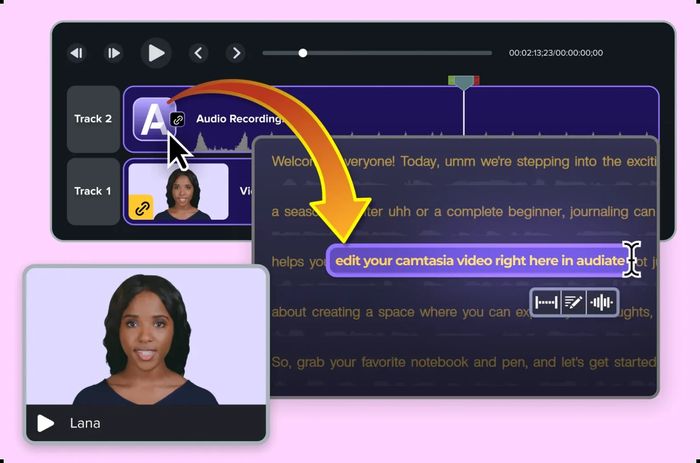
The Audiate relationship is a workflow, not just a licence line. A linked audio clip in the Camtasia timeline opens an Audiate project, so text-based editing of the video and audio happens in the other application.
How does Camtasia compare with DaVinci Resolve, Adobe Premiere Pro and Wondershare Filmora?
Against DaVinci Resolve (8.7), Camtasia loses on almost every axis except the recorder. Camtasia is $179.88/yr, Windows and Mac only, no multicam, basic colour, 4K maximum.
Against Adobe Premiere Pro (7.9), Camtasia is ahead on score but behind on capability. Premiere is $22.99/mo for the single app on an annual plan, or $59.99/mo for All Apps, with a 7-day trial, no one-time licence, multicam, Lumetri colour grading, best-in-class auto captions and 8K+ export. Camtasia's advantage is the screen recorder and the tutorial toolset; Premiere's is everything downstream of the cut.
Against Wondershare Filmora (8.0), the comparison is the one that hurts. Filmora is $49.99/yr or $79.99 perpetual with AI credits extra, runs on Windows, Mac, iOS and Android, has a free version with watermark, a one-time licence, basic multicam, basic colour grading, AI auto captions and 4K export. Camtasia scores lower and costs more than twice as much per year.
| Camtasia | DaVinci Resolve | Adobe Premiere Pro | Wondershare Filmora | |
|---|---|---|---|---|
| Our score | 6.5 | 8.7 | 7.9 | 8.0 |
| Price | From $179.88/yr; perpetual no longer offered new | Free; Studio $295 one-time (free updates) | $22.99/mo single app (annual); $59.99/mo All Apps | $49.99/yr or $79.99 perpetual; AI credits extra |
| Platforms | Win, Mac | Win, Mac, Linux, iPad | Win, Mac | Win, Mac, mobile |
| Free version | 3-day trial | Yes | 7-day trial | Yes (watermark) |
| One-time licence | No | Yes | No | Yes |
| Multicam | No | Yes | Yes | Basic |
| Colour grading | Basic | Industry-leading (Color page) | Lumetri (good) | Basic |
| Auto captions | Yes (Audiate add-on for AI) | Yes (Studio: AI transcription) | Yes, best-in-class | Yes (AI) |
| Max export | 4K | 4K free; 32K Studio | 8K+ | 4K |
Where does Camtasia fall short?
It lost on value and on general editing tools, and the three test cons explain why.
- Expensive for what is, outside screen video, a basic editor.
- Subscription now; perpetual licence discontinued.
- AI features need the separate Audiate subscription.
Read those together and the shape is obvious. The subscription removes the one-time escape hatch that competitors still offer, and the AI features that other editors bundle are a second subscription here.
Is Camtasia worth $179.88 a year?
Over three years the cost is $539.64. That is the number to hold against the work you actually do. If your output is screen video, the recorder and cursor tools are the product and the price is defensible. If your output is general editing, you are paying a tutorial premium for a basic editor.
Who should buy Camtasia?
Trainers and software companies. That is the audience the tool was built for, and the quiz feature, the templates and the single-pass recorder all point the same way. If you make software demos, courses or onboarding video, Camtasia removes steps that other editors make you build by hand. If you edit anything else, the score of 6.5 and the three-year cost tell you to look at the alternatives first.
Camtasia at a Glance
Rubric v1: Editing tools 30 · Performance 20 · Ease of learning 20 · AI & output 10 · Value 20. Score = Σ ÷ 10, locked Sep 11, 2026. How we rank.
Where to buy — prices checked Sep 11, 2026
Camtasia specifications
Where it loses
Value; general editing tools.
Still the right pick for
Trainers and software companies.
What owners say
No reader ratings yet. This block fills in from real submissions only — we never write, buy or generate reader reviews, and none of them touch the editor score.
Every submission is read by a person before it appears. Reader opinion is published separately and never changes our score.
Changelog: Sep 11 — rank 2 → 3 · all changes