Apple Screen Time review 2027
Built into every iPhone, iPad and Mac: app limits, downtime, purchase approval and content filters, managed from a parent's phone

Is the Apple Screen Time Worth It?
Best free option for Apple families. If every device in the house is Apple, Screen Time does most of what a paid app does, for nothing, and the child cannot remove it. It offers no monitoring beyond time and no cross-platform reach, which is what the paid tools sell.
Apple Screen Time Pros & Cons
- Cannot be uninstalled by the child
- Ask-to-Buy approval for every purchase and download
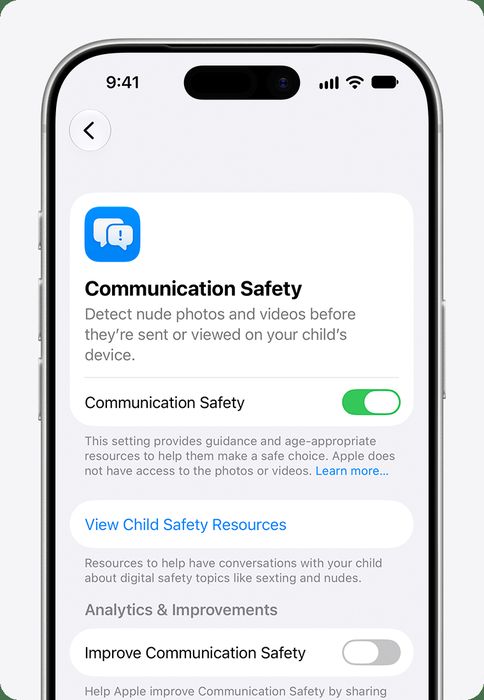
- Communication Safety blurs nudity in Messages
- Free and managed from Family Sharing
- Apple devices only
- No activity reports beyond time per app
- Known bypasses; Apple has patched several
What problem does Apple Screen Time solve for all-Apple households?
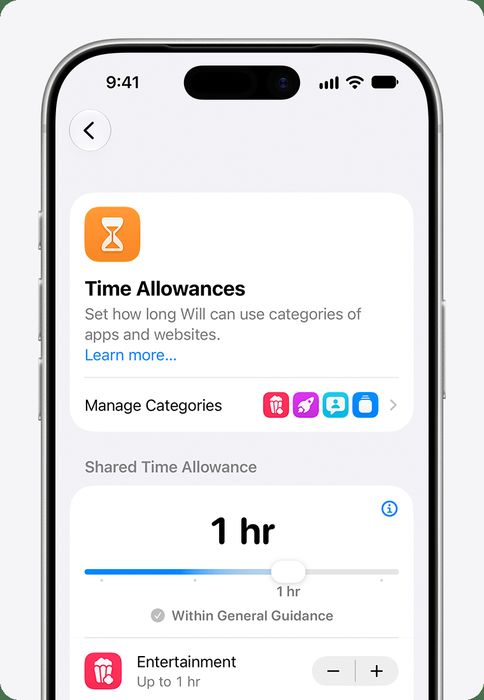
Apple Screen Time is built into every iPhone, iPad and Mac, and it is managed from a parent's phone through Family Sharing. For a household where every device is Apple, that means app limits, downtime, purchase approval and content filters arrive without a download, a subscription or a second account. The child cannot uninstall it, which is the single most useful fact here: the controls sit inside the operating system rather than in an app the child can delete.
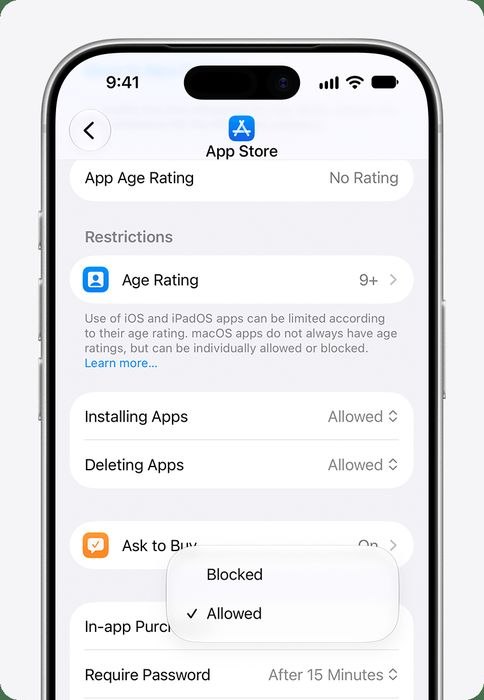
The benefit set is narrow but real. Ask-to-Buy approval covers every purchase and download, so nothing lands on a child's device without a parent tapping approve. Communication Safety blurs nudity in Messages. Screen-time limits, downtime and always-allowed apps are all present, and the whole thing is free.
How did Apple Screen Time score in our testing?
We scored Apple Screen Time across five criteria for a total of 7 out of 10.
- Filtering & limits: 22/30. We measured web and app filtering accuracy on our 40-item checklist, plus daily limits, schedules and app blocking.
- Monitoring: 8/20. This covers activity reports, location, and where offered, alerts on messages and social media.
- Platform coverage: 10/20. We measure how much of the feature set works on iOS, the hardest platform, as well as Android, Windows, Mac and Chromebook.
- Ease of use: 10/10. Setup time per device and how understandable the parent dashboard is.
- Value: 20/20. Annual price for a family of five devices.
The shape of that score is the story. Apple Screen Time is easy and free, and it loses most of its points on monitoring and on reach beyond Apple hardware.
What does Apple Screen Time do well?
On our 40-item checklist it blocked 31 items, which is a strong result for a free tool and the reason filtering and limits scored 22 out of 30. The controls cannot be uninstalled by the child, so there is no removal step to police. Ask-to-Buy approval covers every purchase and download, which handles the app-install problem at the source rather than after the fact. Communication Safety blurs nudity in Messages, and the whole setup is free and managed from Family Sharing, so a parent configures it once from their own phone.
What is Apple Screen Time made of?
There is no hardware and no separate app. The components are the settings Apple ships inside iOS, iPadOS and macOS.
- Price: Free.
- Devices: All family Apple devices.
- Platforms: iOS, iPadOS, macOS.
- Free tier: Yes.
- Full iPhone support: Yes.
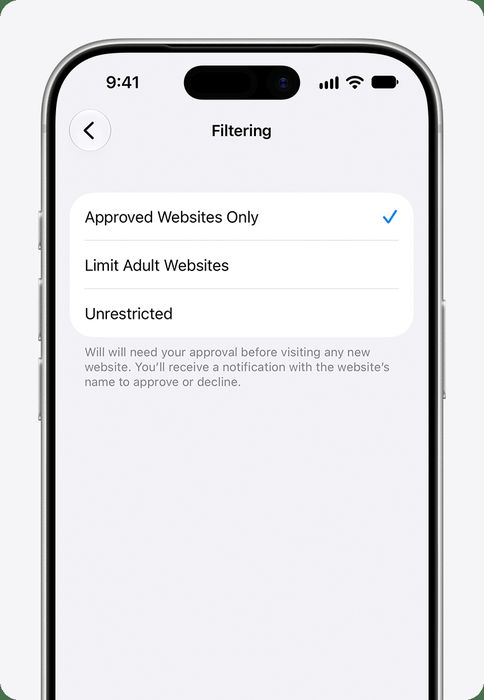
- Web filter: Yes, adult-content filter and allow lists.
- Screen-time limits: Yes, limits, downtime, always-allowed.
- Location: Via Find My.
- Message & social alerts: Communication Safety (nudity blur) only.
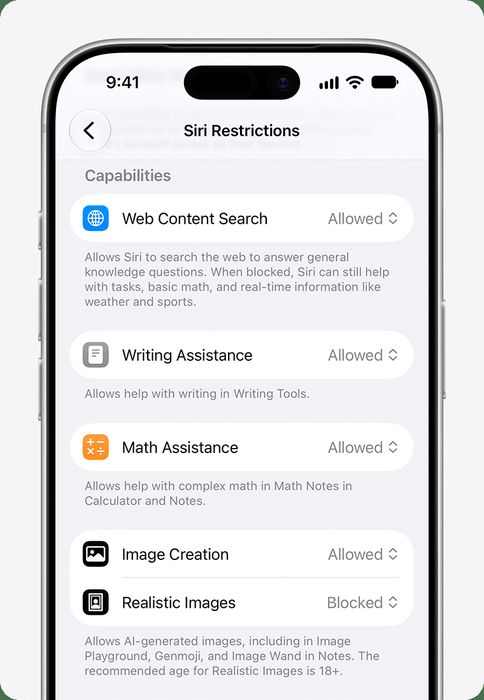
Those nine rows are the entire product. The web filter works through an adult-content filter and allow lists, screen time covers limits, downtime and always-allowed apps, and location comes through Find My rather than a dedicated map inside a parental dashboard.
How does Apple Screen Time compare with the paid apps we tested?
Qustodio scored 8.5 and costs $54.95 a year for five devices on the Basic plan, with a Complete plan at $99.95 and a free plan for one device. It runs on iOS, Android, Windows, Mac, Chromebook and Kindle, filters by category, sets daily limits and schedules, reports location, and adds calls and SMS alerts on Android with the Complete plan. Apple Screen Time is ahead on price and on full iPhone support, and behind on platforms, location reporting and message alerts.
Norton Family scored 7.9 at $49.99 a year for unlimited devices, and it is included with Norton 360 Deluxe and above. It covers Windows, Android and iOS with no Mac or Chromebook support, filters 47 categories, adds School Time, and reports location with alerts. It has no message or social alerts. Apple Screen Time matches it on iPhone support and beats it on price, but Norton covers unlimited devices across three platforms.
Kaspersky Safe Kids scored 7.8 at $14.99 a year for unlimited devices, with a free tier that covers filtering and time limits. It runs on Windows, Mac, Android and iOS, with partial iPhone support, a web filter, screen-time limits and location on the Premium tier. It has no message or social alerts. Apple Screen Time is free and has full iPhone support, while Kaspersky reaches Mac and Android and costs $14.99.
Feature comparison: Apple Screen Time vs the paid apps
The shared labels below are the ones that decide most purchases: price, platforms, free tier, web filter, screen-time limits, location and message alerts.
| Apple Screen Time | Qustodio | Norton Family | Kaspersky Safe Kids | |
|---|---|---|---|---|
| Our score | 7.0 | 8.5 | 7.9 | 7.8 |
| Price | Free | Basic $54.95/yr (5 devices); Complete $99.95/yr; free plan for 1 device | $49.99/yr unlimited devices; included with Norton 360 Deluxe and above | $14.99/yr unlimited devices; free tier |
| Devices | Apple family | 5 | Unlimited | Unlimited |
| Platforms | iOS, iPadOS, macOS | iOS, Android, Windows, Mac, Chromebook, Kindle | Windows, Android, iOS (no Mac, no Chromebook) | Windows, Mac, Android, iOS |
| Free tier | Yes | Yes | Trial | Yes |
| Full iPhone support | Yes | Mostly | Mostly | Partial |
| Web filter | Yes, adult-content filter and allow lists | Yes, category-based | Yes, 47 categories | Yes |
| Screen-time limits | Yes, limits, downtime, always-allowed | Yes, daily limits and schedules | Yes, with School Time | Yes |
| Location | Via Find My | Yes | Yes, with alerts | Yes (Premium) |
Read across the message-alert row and the platform row and the gap is obvious. Bark is the only tested rival with real message and social alerts, covering texts, email, YouTube and 30+ apps, and it is also the only one with no full iPhone support for texts without a computer or the Bark Phone. Net Nanny scored 7.4 at $54.99 a year for five devices, with real-time page analysis in its web filter and no free tier.
Where does Apple Screen Time fall short?
Monitoring and platform coverage are where it lost. There are no activity reports beyond time per app, so a parent sees how long an app was used and not what happened inside it. Location exists only through Find My, not as a reporting feature in a parental dashboard. Communication Safety blurs nudity in Messages and does nothing else: no alerts on bullying, self-harm, predators or social apps, which is exactly what Bark sells.
It is Apple devices only. An Android tablet, a Windows laptop or a Chromebook in the house is outside the system entirely. There are also known bypasses, and while Apple has patched several, the pattern is that determined children find routes around on-device controls.
Is Apple Screen Time good value?
It is free. Our measured cost is $0 per year, and value scored 20 out of 20, the full marks on that criterion. For a family of five Apple devices, that is the entire price of the product.
Who should buy Apple Screen Time?
All-Apple households. If every phone, tablet and computer in the house is an iPhone, iPad or Mac, Screen Time does most of what a paid app does, for nothing, and the child cannot remove it. If you need to see what is being said in messages, or you have an Android, Windows or Chromebook device in the mix, the paid tools in this category are built for exactly that gap.
Apple Screen Time at a Glance
Rubric v1: Filtering & limits 30 · Monitoring 20 · Platform coverage 20 · Ease of use 10 · Value 20. Score = Σ ÷ 10, locked Sep 11, 2026. How we rank.
Where to buy — prices checked Sep 11, 2026
Apple Screen Time specifications
Where it loses
Monitoring and platform coverage.
Still the right pick for
All-Apple households.
What owners say
No reader ratings yet. This block fills in from real submissions only — we never write, buy or generate reader reviews, and none of them touch the editor score.
Every submission is read by a person before it appears. Reader opinion is published separately and never changes our score.